Last Updated on April 27, 2025 by Rajeev Bagra
If you’re running a website and monitoring its performance with SEO tools like Ahrefs, you may have noticed something frustrating:
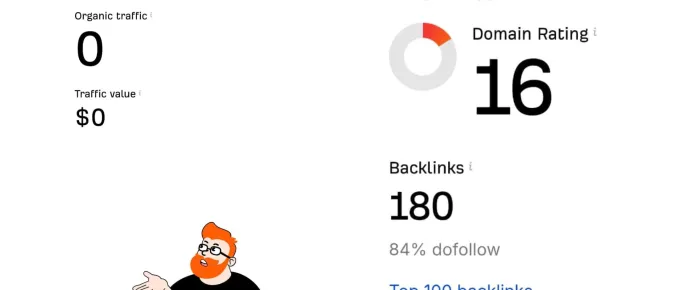
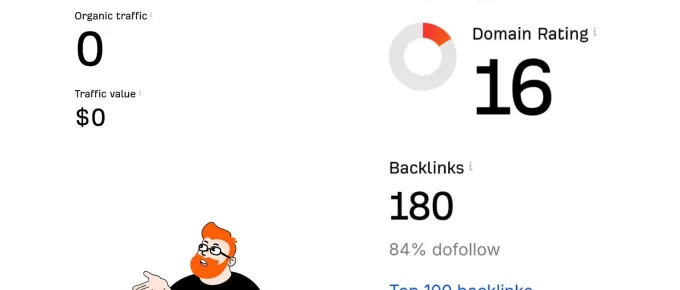
Your site shows Domain Rating (DR) and backlinks, but the Ahrefs Traffic Checker reports zero organic traffic.
You’re not alone. This is a common experience, especially for new sites or sites in very specific niches.
In this article, we’ll explore:
- Why your website shows authority but no traffic in Ahrefs
- How Ahrefs estimates traffic
- Why Ahrefs sometimes underreports traffic
- Actionable strategies to break into Ahrefs traffic estimates
- Bonus tips to improve organic discovery faster
Let’s dive in!
Understanding the Issue: Authority vs Traffic in Ahrefs
First, it’s important to know how Ahrefs works:
- Domain Rating (DR) measures the strength of your backlink profile compared to other sites.
- Traffic is an estimate based on keywords Ahrefs can detect your site ranking for in search engines (mainly Google).
This means:
You can have a strong DR and good backlinks, but if Ahrefs’ crawler can’t detect your site ranking for any noticeable keywords yet, it will still show zero or near-zero traffic.
This does not necessarily mean you’re getting no real human visitors — it just means your rankings aren’t yet visible enough for Ahrefs to pick them up.
Why Ahrefs Traffic Checker Shows Zero for Some Sites
- Keyword rankings too low
Your site might be ranking past page 2 or 3 — Ahrefs focuses more on top-ranking pages that generate meaningful traffic. - Niche or Long-tail keywords
If you’re ranking for very specific long-tail keywords that Ahrefs’ keyword database isn’t actively tracking, it may miss them. - New or low-indexed pages
Google may have indexed your pages, but Ahrefs hasn’t crawled them yet, or it doesn’t see enough SEO signals to estimate traffic. - Low search volume topics
Even if you rank #1 for a term, if that keyword has very little search volume, Ahrefs might record it but estimate zero traffic impact. - Regional targeting differences
If your site ranks in a non-US country, but Ahrefs’ database focuses on US or global keywords, it can underreport your traffic.
How Ahrefs Estimates Traffic
Ahrefs uses a predictive model:
- It tracks millions of keywords.
- It monitors your site’s rankings for those keywords.
- It uses the estimated search volume and click-through rates (CTR) to calculate traffic estimates.
If your site isn’t ranking high enough for tracked keywords, your estimated traffic = 0, even if you’re getting some real visitors.
How to Break Into Ahrefs Traffic Checker Results: Action Plan
Here’s how you can start showing up in Ahrefs Traffic Checker with visible numbers:
1. Target Tracked, Mid-volume Keywords
- Focus on keywords Ahrefs tracks (not just ultra-specific ones).
- Use Ahrefs’ Keyword Explorer to find keywords with 100–1000 monthly searches where competition is still low.
Example: Instead of “best eco-friendly yoga mat for short people,” optimize for “best yoga mats 2025”.
2. Create Pages Focused on One Primary Keyword
- Each page should revolve around one clear, targetable keyword.
- Include that keyword naturally in:
- The title
- The first paragraph
- A heading (H1 or H2)
- URL slug
- Meta description
- Image alt text (where appropriate)
Pro Tip: Also sprinkle 2–3 related secondary keywords.
3. Optimize for SERP Click-Through
- Write titles and meta descriptions that are clickable, not just keyword-stuffed.
- Think: If a human reads your search result, would they click it?
- Higher CTR can boost rankings, helping Ahrefs pick up your site faster.
Example:
Instead of “Best Yoga Mats Home Page”, use “Top 10 Yoga Mats for Beginners in 2025 [Expert Picks]”.
4. Get Niche Backlinks to New Pages
- Link-building matters, even for internal pages.
- Reach out to niche blogs, directories, and partners to get 2–3 backlinks to each new high-quality post you publish.
- Even one strong backlink can boost a page into Ahrefs’ visibility.
5. Submit New Pages to Google
- Use Google Search Console to request indexing immediately after publishing.
- Faster indexing means faster visibility — both for Google users and SEO tools.
6. Create Consistent Fresh Content
- Sites with regular publishing schedules are crawled more frequently.
- Try to publish at least 1–2 SEO-optimized posts per week targeting new keywords.
7. Promote Your Content for Early Traction
- Share on social media, niche forums (like Reddit, Quora), email newsletters, and syndication platforms.
- Early real traffic → Better user metrics → Higher search rankings → More visibility in Ahrefs.
Bonus Tips to Speed Up Your Growth
- Update old content: Refresh articles every 3–6 months.
- Cluster your content: Create topic clusters around core themes to build topical authority.
- Use internal linking: Link from old posts to new posts and vice versa.
- Focus on E-E-A-T (Experience, Expertise, Authority, Trust): Particularly important for new sites.
Conclusion: Breaking Into Ahrefs Visibility is Possible!
Remember, Ahrefs is just a tool, and its traffic estimates aren’t always 100% accurate — especially for smaller or niche websites.
You can break into their Traffic Checker results by:
- Targeting mid-volume, tracked keywords
- Optimizing content for SEO and CTR
- Building strategic backlinks
- Publishing regularly